Summary: Submit to IFL 2011. It's a great breeding ground for ideas.
The IFL 2011 submission deadline has been extended until 31st August, and, in a move I thoroughly agree with, the notification of acceptance is now within 24 hours of submission!
IFL (and TFP) do not work in the same way as ICFP/Haskell Symposium. You submit a paper, describing the work you've done (something functional programming related) and then present the paper. After the conference, you resubmit the paper, and the result is reviewed in greater depth. There is a great opportunity to learn from the experience, and produce a second paper that is far better.
I submitted my original supercompilation work to IFL 2007. You can compare the paper I submitted before the conference with the paper I submitted afterwards. Note that the original paper doesn't even mention the word supercompilation! At the conference I talked to many people, learnt a lot about supercompilation, program optimisation and termination orderings (and lots of other interesting topics). Using this experience, and building on the enthusiasm people had expressed, I was able to produce a much better second paper. My work on supercompilation went into my thesis, and lead to a subsequent ICFP paper.
I think that IFL/TFP are great venues for to present your work, and in presenting and discussing it, to understand more about the work - making it better in the process. You have just under 2 weeks to make the IFL 2011 deadline of 31st August.
Friday, August 19, 2011

Sunday, July 17, 2011
Submit to the Haskell Implementors Workshop
Are you going to ICFP 2011 in Japan? Do you work with Haskell? You should consider offering a talk for the Haskell Implementors Workshop! You have until this coming Friday (22nd July 2011) to offer a talk, by emailing an abstract (less than 200 words) to benl -AT- cse.unsw.edu.au - for full details see the Call for Talks. Talks are 20 minutes long, plus 10 minutes for questions.
What topics are suitable?
If you have been doing or thinking stuff that would interest a bunch of Haskell implementors in a pub, you probably have something suitable for a talk. The aim of the workshop is to provide an "opportunity to bat around ideas, share experiences, and ask for feedback from fellow experts". Unlike ICFP or the Haskell Symposium, there are no published proceedings. If you have some work that isn't quite ready for a more formal setting, this workshop is a useful venue to seek feedback. If you have an idea which seems a bit crazy, it's probably also very interesting!
What if I have less to say?
In addition to the 30 minute talks, the Haskell Implementors Workshop will also have 2-10 minute lightening talks, organised on the day. Attend the workshop, and sign up on the day to give a brief talk.
What topics are suitable?
If you have been doing or thinking stuff that would interest a bunch of Haskell implementors in a pub, you probably have something suitable for a talk. The aim of the workshop is to provide an "opportunity to bat around ideas, share experiences, and ask for feedback from fellow experts". Unlike ICFP or the Haskell Symposium, there are no published proceedings. If you have some work that isn't quite ready for a more formal setting, this workshop is a useful venue to seek feedback. If you have an idea which seems a bit crazy, it's probably also very interesting!
What if I have less to say?
In addition to the 30 minute talks, the Haskell Implementors Workshop will also have 2-10 minute lightening talks, organised on the day. Attend the workshop, and sign up on the day to give a brief talk.
Saturday, June 18, 2011
Changing the Windows titlebar gradient colors
Summary: This post describes how to change the gradient colors of the titlebar of a single window on Windows XP, using C#.
On Windows XP the titlebar of most windows have a gradient coloring:

For various reasons, I wanted to override the titlebar gradient colors on a single window. The SetSysColors function can change the colors, but that applies to all windows and immediately forces all windows to repaint, which is slow and very flickery. You can paint the titlebar your self (like Chrome does), but then you need to draw and handle min/max buttons etc. After some experimentation, using the unofficial SetSysColorsTemp function, I was able to change the gradient for a single window. As an example, here are some screenshots, overriding the left color with green, then overriding both the colors with green/blue and orange/blue:

Disclaimer: This code uses an undocumented function, and while it seems to work robustly on my copy of Windows XP, it unlikely to work on future versions of Windows. Generally, it is a bad idea to override user preferences - for example the titlebar text may not be visible with overridden gradient colors.
All the necessary code is available at the bottom of this post, and can be used by anyone, for any purpose. The crucial function is SetSysColorsTemp, which takes an array of colors and an array of brushes created from those colors. If you call SetSysColorsTemp passing a new array of colors/brushes they will override the global system colors until a reboot, without forcing a repaint. Passing null for both arrays will restore the colors to how they were before. To make the color change only for the current window we hook into WndProc, and detect when the colors are about to be used in a paint operation. We set the system colors before, call base.WndProc which paints the titlebar (using our modified system colors), then put the colors back.
There are two known issues:
1) If you change the colors after the titlebar has drawn, it will not use the colors until the titlebar next repaints. I suspect this problem is solvable.
2) As you can see in the demo screenshots, the area near the min/max buttons does not usually get recolored. If you only change the left gradient color this doesn't matter.
On Windows XP the titlebar of most windows have a gradient coloring:
For various reasons, I wanted to override the titlebar gradient colors on a single window. The SetSysColors function can change the colors, but that applies to all windows and immediately forces all windows to repaint, which is slow and very flickery. You can paint the titlebar your self (like Chrome does), but then you need to draw and handle min/max buttons etc. After some experimentation, using the unofficial SetSysColorsTemp function, I was able to change the gradient for a single window. As an example, here are some screenshots, overriding the left color with green, then overriding both the colors with green/blue and orange/blue:
Disclaimer: This code uses an undocumented function, and while it seems to work robustly on my copy of Windows XP, it unlikely to work on future versions of Windows. Generally, it is a bad idea to override user preferences - for example the titlebar text may not be visible with overridden gradient colors.
All the necessary code is available at the bottom of this post, and can be used by anyone, for any purpose. The crucial function is SetSysColorsTemp, which takes an array of colors and an array of brushes created from those colors. If you call SetSysColorsTemp passing a new array of colors/brushes they will override the global system colors until a reboot, without forcing a repaint. Passing null for both arrays will restore the colors to how they were before. To make the color change only for the current window we hook into WndProc, and detect when the colors are about to be used in a paint operation. We set the system colors before, call base.WndProc which paints the titlebar (using our modified system colors), then put the colors back.
There are two known issues:
1) If you change the colors after the titlebar has drawn, it will not use the colors until the titlebar next repaints. I suspect this problem is solvable.
2) As you can see in the demo screenshots, the area near the min/max buttons does not usually get recolored. If you only change the left gradient color this doesn't matter.
public class GradientForm : Form
{
    // Win32 API calls, often based on those from pinvoke.net
    [DllImport("gdi32.dll")] static extern bool DeleteObject(int hObject);
    [DllImport("user32.dll")] static extern int SetSysColorsTemp(int[] lpaElements, int [] lpaRgbValues, int cElements);
    [DllImport("gdi32.dll")] static extern int CreateSolidBrush(int crColor);
    [DllImport("user32.dll")] static extern int GetSysColorBrush(int nIndex);
    [DllImport("user32.dll")] static extern int GetSysColor(int nIndex);
    [DllImport("user32.dll")] private static extern IntPtr GetForegroundWindow();

    // Magic constants
    const int SlotLeft = 2;
    const int SlotRight = 27;
    const int SlotCount = 28; // Math.Max(SlotLeft, SlotRight) + 1;

    // The colors/brushes to use
    int[] Colors = new int[SlotCount];
    int[] Brushes = new int[SlotCount];

    // The colors the user wants to use
    Color titleBarLeft, titleBarRight;
    public Color TitleBarLeft{get{return titleBarLeft;} set{titleBarLeft=value; UpdateBrush(SlotLeft, value);}}
    public Color TitleBarRight{get{return titleBarRight;} set{titleBarRight=value; UpdateBrush(SlotRight, value);}}

    void CreateBrushes()
    {
        for (int i = 0; i < SlotCount; i++)
        {
            Colors[i] = GetSysColor(i);
            Brushes[i] = GetSysColorBrush(i);
        }
        titleBarLeft = ColorTranslator.FromWin32(Colors[SlotLeft]);
        titleBarRight = ColorTranslator.FromWin32(Colors[SlotRight]);
    }

    void UpdateBrush(int Slot, Color c)
    {
        DeleteObject(Brushes[Slot]);
        Colors[Slot] = ColorTranslator.ToWin32(c);
        Brushes[Slot] = CreateSolidBrush(Colors[Slot]);
    }

    void DestroyBrushes()
    {
        DeleteObject(Brushes[SlotLeft]);
        DeleteObject(Brushes[SlotRight]);
    }

    // Hook up to the Window

    public GradientForm()
    {
        CreateBrushes();
    }

    protected override void Dispose(bool disposing)
    {
        if (disposing) DestroyBrushes();
        base.Dispose(disposing);
    }

    protected override void WndProc(ref System.Windows.Forms.Message m)
    {
        const int WM_NCPAINT = 0x85;
        const int WM_NCACTIVATE = 0x86;

        if ((m.Msg == WM_NCACTIVATE && m.WParam.ToInt32() != 0) ||
            (m.Msg == WM_NCPAINT && GetForegroundWindow() == this.Handle))
        {

            int k = SetSysColorsTemp(Colors, Brushes, Colors.Length);
            base.WndProc(ref m);
            SetSysColorsTemp(null, null, k);
        }
        else
            base.WndProc(ref m);
    }
}
Tuesday, June 07, 2011
INLINE pragmas in the Safe library
Summary: The Safe library has lots of small functions, none of which have INLINE pragmas on them. The lack of INLINE pragmas probably has no effect on the optimisation.
I was recently asked a question about the Safe library:
When compiling with optimisations, GHC tries to inline functions/values that are either "small enough" or have an INLINE pragma. These functions will be inlined within their module, and will also be placed in their module's interface file, for inlining into other modules. The advantage of inlining is avoiding the function call overhead, and possibly exposing further optimisations. The disadvantage is that the code size may grow, which may result in poor utilisation of the processor's instruction cache.
The Safe library contains wrappers for lots of partial Prelude and Data.List functions (i.e. head), with versions that don't fail, or fail with more debugging information. Using the tail function as an example, the library supplies four additional variants:
As the questioner correctly noted, there are no INLINE pragmas in the library. Taking the example of tailSafe, it is defined as:
Given this indirection, and the lack of an INLINE pragma, is calling tailSafe as cheap as you might hope? We can answer this question by looking at the interface file at the standard optimisation level, by running ghc -ddump-hi Safe.hs -O -c. Looking at the definition attached to tailSafe, we see:
The tailSafe function has been optimised as much as it can be, and will be inlined into other modules. Adding an INLINE pragma would have no effect at standard optimisation. When compiling without optimisation, even with an INLINE pragma, the function is not included in the module's interface. Adding the INLINE pragma to tailSafe is of no benefit.
Let us now look at all functions in the Safe module. When compiled without optimisation (-O0) no functions are placed in the interface file. At all higher levels of optimisation (-O1 and -O2) the interface files are identical. Looking through the functions, only 6 functions are not included in the interface files:
abort
The abort function is defined as:
Neither adding an INLINE pragma or eta expanding (adding an additional argument) includes the function in the interface file. I suspect that GHC decides no further optimisation is possible, so doesn't ever inline abort.
atMay and $watMay
The functionatMay is recursive, and thus cannot be inlined even when it's definition is available, so GHC sensibly omits it from the interface file. The function $watMay is the worker/wrapper definition of atMay, which is also recursive.
readNote and readMay
The functions readNote and readMay both follow exactly the same pattern, so I describe only readNote. The function readNote is quite big, and GHC has split it into two top-level functions - producing both readNote and readNote1. The function readNote is included in the interface file, but readNote1 is not. The result is that GHC will be able to partially inline the original definition of readNote - however, the read functions tend to be rather complex, so GHC is unlikely to benefit from the additional inlining it has managed to acheive.
atNote
The atNote function is bigger than the inlining threshold, so does not appear in the interface file unless an INLINE pragma is given. Since the inner loop of atNote is recursive, it is unlikely that inlining would give any noticable benefit, so GHC's default behaviour is appropriate.
Conclusion
Having analysed the interface files, I do not think it is worth adding INLINE pragmas to the Safe library - GHC does an excellent job without my intervention. My advice is to only add INLINE pragmas after either profiling, or analysing the resulting Core program.
I was recently asked a question about the Safe library:
I was wondering why you didn't use any INLINE pragmas in the Safe library. I'm not a Haskell expert yet, but I've noticed that in many other libraries most one-liners are annotated by INLINE pragmas, so is there any reason you didn't add them to Safe as well?
When compiling with optimisations, GHC tries to inline functions/values that are either "small enough" or have an INLINE pragma. These functions will be inlined within their module, and will also be placed in their module's interface file, for inlining into other modules. The advantage of inlining is avoiding the function call overhead, and possibly exposing further optimisations. The disadvantage is that the code size may grow, which may result in poor utilisation of the processor's instruction cache.
The Safe library contains wrappers for lots of partial Prelude and Data.List functions (i.e. head), with versions that don't fail, or fail with more debugging information. Using the tail function as an example, the library supplies four additional variants:
- tail :: [a] -> [a], crashes on tail []
- tailNote :: String -> [a] -> [a], takes an extra argument which supplements the error message
- tailDef :: [a] -> [a] -> [a], takes a default to return instead of errors
- tailMay :: [a] -> Maybe [a], wraps the result in a Maybe
- tailSafe :: [a] -> [a], returns some sensible default if possible, [] in the case of tail
As the questioner correctly noted, there are no INLINE pragmas in the library. Taking the example of tailSafe, it is defined as:
tailSafe :: [a] -> [a]
tailSafe = liftSafe tail null

liftSafe :: (a -> a) -> (a -> Bool) -> (a -> a)
liftSafe func test val = if test val then val else func val
Given this indirection, and the lack of an INLINE pragma, is calling tailSafe as cheap as you might hope? We can answer this question by looking at the interface file at the standard optimisation level, by running ghc -ddump-hi Safe.hs -O -c. Looking at the definition attached to tailSafe, we see:
tailSafe = \val -> case val of
    [] -> []
    ds1:ds2 -> ds2
The tailSafe function has been optimised as much as it can be, and will be inlined into other modules. Adding an INLINE pragma would have no effect at standard optimisation. When compiling without optimisation, even with an INLINE pragma, the function is not included in the module's interface. Adding the INLINE pragma to tailSafe is of no benefit.
Let us now look at all functions in the Safe module. When compiled without optimisation (-O0) no functions are placed in the interface file. At all higher levels of optimisation (-O1 and -O2) the interface files are identical. Looking through the functions, only 6 functions are not included in the interface files:
abort
The abort function is defined as:
abort = error
Neither adding an INLINE pragma or eta expanding (adding an additional argument) includes the function in the interface file. I suspect that GHC decides no further optimisation is possible, so doesn't ever inline abort.
atMay and $watMay
The function
readNote and readMay
The functions readNote and readMay both follow exactly the same pattern, so I describe only readNote. The function readNote is quite big, and GHC has split it into two top-level functions - producing both readNote and readNote1. The function readNote is included in the interface file, but readNote1 is not. The result is that GHC will be able to partially inline the original definition of readNote - however, the read functions tend to be rather complex, so GHC is unlikely to benefit from the additional inlining it has managed to acheive.
atNote
The atNote function is bigger than the inlining threshold, so does not appear in the interface file unless an INLINE pragma is given. Since the inner loop of atNote is recursive, it is unlikely that inlining would give any noticable benefit, so GHC's default behaviour is appropriate.
Conclusion
Having analysed the interface files, I do not think it is worth adding INLINE pragmas to the Safe library - GHC does an excellent job without my intervention. My advice is to only add INLINE pragmas after either profiling, or analysing the resulting Core program.
Sunday, May 22, 2011
Hoogle talk from TFP 2011 [PDF]
Last week I went to TFP 2011, and gave a talk on Hoogle entitled "Finding Functions from Types". The slides are now available online. These slides give some information about how the type searching works in Hoogle, and I intend to write further details in the future.
Sunday, May 08, 2011
CmdArgs is not dangerous
Summary: CmdArgs can be used purely, and even if you choose to use it in an impure manner, you don't need to worry.
As a result of my blog post yesterday, a few people have said they have been put off using CmdArgs. There are three reasons why you shouldn't be put off using CmdArgs, even though it has some impure code within it.
1: You can use CmdArgs entirely purely
You do not need to use the impure code at all. The module System.Console.CmdArgs.Implict provides two ways to write annotated records. The first way is impure, and uses cmdArgs and &=. The second way is pure, and uses cmdArgs_ and +=. Both ways have exactly the same power. For example, you can write either of:
The first definition is impure. The second is pure. Both are equivalent. I prefer the syntax of the first version, but the second version is not much longer or uglier. If the impurities scare you, just switch. The Implicit module documentation describes four simple rules for converting between the two methods.
2: You do not need to use annotated records at all
Notice that the above module is called Implicit, CmdArgs also features an Explicit version where you create a data type representing your command line arguments (which is entirely pure). For example:
Here you construct modes and flags explicitly, and pass functions which describe how to update the command line state. Everything in the Implicit module maps down to the Explicit module. In addition, you can use the GetOpt compatibility layer, which also maps down to the Explicit parser.
Having written command line parsers with annotated records, I'd never go back to writing them out in full. However, if you want to map your own command line parser description down to the Explicit version you can get help messages and parsing for free.
3: I fight the optimiser so you don't have to
Even if you choose to use the impure implicit version of CmdArgs, you don't need to do anything, even at high optimisation levels. I have an extensive test suite, and will continue to ensure CmdArgs programs work properly - I rely on it for several of my programs. While I find the implicit impure nicer to work with, I am still working on making a pure version with the same syntax, developing alternative methods of describing the annotations, developing quasi-quoters etc.
As a result of my blog post yesterday, a few people have said they have been put off using CmdArgs. There are three reasons why you shouldn't be put off using CmdArgs, even though it has some impure code within it.
1: You can use CmdArgs entirely purely
You do not need to use the impure code at all. The module System.Console.CmdArgs.Implict provides two ways to write annotated records. The first way is impure, and uses cmdArgs and &=. The second way is pure, and uses cmdArgs_ and +=. Both ways have exactly the same power. For example, you can write either of:
sample = cmdArgs $
    Sample{hello = def &= help "World argument" &= opt "world"}
    &= summary "Sample v1"

sample = cmdArgs_ $
    record Sample{} [hello := def += help "World argument" += opt "world"]
    += summary "Sample v1"
The first definition is impure. The second is pure. Both are equivalent. I prefer the syntax of the first version, but the second version is not much longer or uglier. If the impurities scare you, just switch. The Implicit module documentation describes four simple rules for converting between the two methods.
2: You do not need to use annotated records at all
Notice that the above module is called Implicit, CmdArgs also features an Explicit version where you create a data type representing your command line arguments (which is entirely pure). For example:
arguments :: Mode [(String,String)]
arguments = mode "explicit" [] "Explicit sample program" (flagArg (upd "file") "FILE")
     [flagOpt "world" ["hello","h"] (upd "world") "WHO" "World argument"
     ,flagReq ["greeting","g"] (upd "greeting") "MSG" "Greeting to give"
     ,flagHelpSimple (("help",""):)]
     where upd msg x v = Right $ (msg,x):v
Here you construct modes and flags explicitly, and pass functions which describe how to update the command line state. Everything in the Implicit module maps down to the Explicit module. In addition, you can use the GetOpt compatibility layer, which also maps down to the Explicit parser.
Having written command line parsers with annotated records, I'd never go back to writing them out in full. However, if you want to map your own command line parser description down to the Explicit version you can get help messages and parsing for free.
3: I fight the optimiser so you don't have to
Even if you choose to use the impure implicit version of CmdArgs, you don't need to do anything, even at high optimisation levels. I have an extensive test suite, and will continue to ensure CmdArgs programs work properly - I rely on it for several of my programs. While I find the implicit impure nicer to work with, I am still working on making a pure version with the same syntax, developing alternative methods of describing the annotations, developing quasi-quoters etc.
Saturday, May 07, 2011
CmdArgs - Fighting the GHC Optimiser
Summary: Everyone using GHC 7 should upgrade to CmdArgs 0.7. GHC's optimiser got better, so CmdArgs optimiser avoidance code had to get better too.
Update: Has this post scared you off CmdArgs? Read why CmdArgs is not dangerous.
CmdArgs is a Haskell library for concisely specifying the command line arguments, see this post for an introduction. I have just released versions 0.6.10 and 0.7 of CmdArgs, which are a strongly recommended upgrade, particular for GHC 7 users. (The 0.6.10 is so anyone who specified 0.6.* in their Cabal file gets an automatic upgrade, and 0.7 is so people can write 0.7.* to require the new version.)
Why CmdArgs is impure
CmdArgs works by annotating fields to determine what command line argument parsing you want. Consider the data type:
By default this will create a command line which would respond to myprogram --file=foo. If instead we want to use myprogram foo we need to attach the annotation args to the file field. We can do this in CmdArgs with:
However, CmdArgs does not have to be impure - you can equally use the pure variant of CmdArgs and write:
Sadly, this code is a little more ugly. I prefer the impure version, but everything is supported in both versions.
I am still experimenting with other ways of writing an annotated record, weighing the trade-offs between purity, safety and the syntax required. I have been experimenting with pure variants tonight, and hope in a future release to make CmdArgs pure by default.
GHC vs CmdArgs
Because CmdArgs uses unsafe and untracked side effects, GHC's optimiser can manipulate the program in ways that change the semantics. A standard example where GHC's optimiser can harm CmdArgs is:
Here the subexpression "" &= typFile is duplicated, and if GHC spots this duplication, it can use common sub-expression eliminate to transform the program to:
Unfortunately, because CmdArgs is impure, this program attaches the annotation to file1, but not file2.
This optimisation problem happens in practice, and can be eliminated by writing {-# OPTIONS_GHC -fno-cse #-} in the source file defining the annotations. However, it is burdensome to require all users of CmdArgs to add pragmas to their code, so I investigated how to reduce the problem.
Beating GHC 6.10.4
The key function used to beat GHC's optimiser is &=. It is defined as:
In order to stop CSE, I use two tricks. Firstly, I mark &= as INLINE, so that it's definition ends up in the annotations - allowing me to try and modify the expression so it doesn't become suitable for CSE. For GHC 6.10.4 I then made up increasingly random expressions, with increasingly random pragmas, until the problem went away. The end solution was:
Beating GHC 7.0.1
Unfortunately, after upgrading to GHC 7.0.1, the problem happened again. I asked for help, and then started researching GHC's CSE optimiser (using the Hoogle support for GHC I added last weekend - a happy coincidence). The information I found is summarised here. Using this information I was able to construct a much more targeted solution (which I can actually understand!):
As before, we INLINE the &=, so it gets into the annotations. Now we want to make all annotations appear different, even though they are the same. We use unique which is equivalent to id, but when wrapped around an expression causes all instances to appear different under CSE. The unit binding has the value (), but in a way that GHC can't reduce, so the case does not get eliminated. GHC does not CSE case expressions, so all annotations are safe.
How GHC will probably defeat CmdArgs next
There are three avenues GHC could explore to defeat CmdArgs:
Of these optimisations, I consider the reduction of unit to be most likely, but also the easiest to counteract.
How CmdArgs will win
The only safe way for CmdArgs to win is to rewrite the library to be pure. I am working on various annotation schemes and hope to have something available shortly.
Update: Has this post scared you off CmdArgs? Read why CmdArgs is not dangerous.
CmdArgs is a Haskell library for concisely specifying the command line arguments, see this post for an introduction. I have just released versions 0.6.10 and 0.7 of CmdArgs, which are a strongly recommended upgrade, particular for GHC 7 users. (The 0.6.10 is so anyone who specified 0.6.* in their Cabal file gets an automatic upgrade, and 0.7 is so people can write 0.7.* to require the new version.)
Why CmdArgs is impure
CmdArgs works by annotating fields to determine what command line argument parsing you want. Consider the data type:
data Opts = Opts {file :: FilePath}
By default this will create a command line which would respond to myprogram --file=foo. If instead we want to use myprogram foo we need to attach the annotation args to the file field. We can do this in CmdArgs with:
cmdArgs $ Opts {file = "" &= args}
However, CmdArgs does not have to be impure - you can equally use the pure variant of CmdArgs and write:
cmdArgs_ $ record Opts{} [file := "" += args]
Sadly, this code is a little more ugly. I prefer the impure version, but everything is supported in both versions.
I am still experimenting with other ways of writing an annotated record, weighing the trade-offs between purity, safety and the syntax required. I have been experimenting with pure variants tonight, and hope in a future release to make CmdArgs pure by default.
GHC vs CmdArgs
Because CmdArgs uses unsafe and untracked side effects, GHC's optimiser can manipulate the program in ways that change the semantics. A standard example where GHC's optimiser can harm CmdArgs is:
Opts2 {file1 = "" &= typFile, file2 = "" &= typFile}
Here the subexpression "" &= typFile is duplicated, and if GHC spots this duplication, it can use common sub-expression eliminate to transform the program to:
let x = "" &= typFile in Opts2 {file1 = x, file2 = x}
Unfortunately, because CmdArgs is impure, this program attaches the annotation to file1, but not file2.
This optimisation problem happens in practice, and can be eliminated by writing {-# OPTIONS_GHC -fno-cse #-} in the source file defining the annotations. However, it is burdensome to require all users of CmdArgs to add pragmas to their code, so I investigated how to reduce the problem.
Beating GHC 6.10.4
The key function used to beat GHC's optimiser is &=. It is defined as:
(&=) :: (Data val, Data ann) => val -> ann -> val
(&=) x y = addAnn x y
In order to stop CSE, I use two tricks. Firstly, I mark &= as INLINE, so that it's definition ends up in the annotations - allowing me to try and modify the expression so it doesn't become suitable for CSE. For GHC 6.10.4 I then made up increasingly random expressions, with increasingly random pragmas, until the problem went away. The end solution was:
{-# INLINE (&=) #-}
(&=) :: (Data val, Data ann) => val -> ann -> val
(&=) x y = addAnn (id_ x) (id_ y)

{-# NOINLINE const_ #-}
const_ :: a -> b -> b
const_ f x = x

{-# INLINE id_ #-}
id_ :: a -> a
id_ x = const_ (\() -> ()) x
Beating GHC 7.0.1
Unfortunately, after upgrading to GHC 7.0.1, the problem happened again. I asked for help, and then started researching GHC's CSE optimiser (using the Hoogle support for GHC I added last weekend - a happy coincidence). The information I found is summarised here. Using this information I was able to construct a much more targeted solution (which I can actually understand!):
{-# INLINE (&=) #-}
(&=) x y = addAnn x (unique x)

{-# INLINE unique #-}
unique x = case unit of () -> x
    where unit = reverse "" `seq` ()
As before, we INLINE the &=, so it gets into the annotations. Now we want to make all annotations appear different, even though they are the same. We use unique which is equivalent to id, but when wrapped around an expression causes all instances to appear different under CSE. The unit binding has the value (), but in a way that GHC can't reduce, so the case does not get eliminated. GHC does not CSE case expressions, so all annotations are safe.
How GHC will probably defeat CmdArgs next
There are three avenues GHC could explore to defeat CmdArgs:
- Reorder the optimisation phases. Performing CSE before inlining would defeat everything, as any tricks in &= would be ignored.
- Better CSE. Looking inside case would defeat my scheme.
- Reduce unit to (). This reduction could be done in a number of ways:
- Constructor specialisation of reverse should manage to reduce reverse to "", which then seq can evaluate, and then eliminate the case. I'm a little surprised this isn't already happening, but I'm sure it will one day.
- Supercompilation can inline recursive functions, and inlining reverse would eliminate the case.
- If GHC could determine reverse "" was total it could eliminate the seq without knowing it's value. This is somewhat tricky for reverse as it isn't total for infinite lists.
Of these optimisations, I consider the reduction of unit to be most likely, but also the easiest to counteract.
How CmdArgs will win
The only safe way for CmdArgs to win is to rewrite the library to be pure. I am working on various annotation schemes and hope to have something available shortly.
Sunday, May 01, 2011
Searching GHC with Hoogle
Summary: Hoogle can now search the GHC source code. There are also lots of small improvements in the latest version.
A few weeks ago Ranjit Jhala asked me for help getting Hoogle working on the GHC documentation. As a result of this conversation, I've now released Hoogle 4.2.3, and upgraded the Hoogle web tool.
For GHC developers
You can search the GHC documentation using the standard Hoogle website, for example: llvm +ghc
To search within a package simply write +package in your search query. The ghc package on Hoogle includes all the internals for GHC.
If you want to search using the console, you can install Hoogle and generate the GHC package database with:
You can now perform searches with:
For all Hoogle users
The new release of Hoogle contains a number of small enhancements:
The theory behind Hoogle
I'll be talking about the theory behind type searching in Hoogle at Trends in Functional Programming 2011 in Madrid in a few weeks time. It's not too late to register.
A few weeks ago Ranjit Jhala asked me for help getting Hoogle working on the GHC documentation. As a result of this conversation, I've now released Hoogle 4.2.3, and upgraded the Hoogle web tool.
For GHC developers
You can search the GHC documentation using the standard Hoogle website, for example: llvm +ghc
To search within a package simply write +package in your search query. The ghc package on Hoogle includes all the internals for GHC.
If you want to search using the console, you can install Hoogle and generate the GHC package database with:
cabal update
cabal install hoogle
hoogle data default ghc
You can now perform searches with:
hoogle +ghc llvm
For all Hoogle users
The new release of Hoogle contains a number of small enhancements:
- The web server has been upgraded to Warp. I'll write a blog post shortly on the move to Warp - but generally it's been a very positive step.
- Some of the snippets of documentation have been fixed, where the markup was interpreted wrongly.
- There is only an expand button next to the documentation if there is more information to expand.
- Some iPad integration, so you can now add it to your home page with a nice icon.
- Work on a deployment script to automate uploading a new version to the web server, which will allow for more frequent updates (until now it took over 2 hours to deploy a new version).
- Updates as some web resources moved around, particularly the Haskell Platform cabal file.
The theory behind Hoogle
I'll be talking about the theory behind type searching in Hoogle at Trends in Functional Programming 2011 in Madrid in a few weeks time. It's not too late to register.
Friday, April 29, 2011
Darcs for my Wife
Summary: Using the version control system Darcs is simple. This document describes the commands I use in my workflow.
Darcs is my favourite version control system because of its simple user interface. I am able to do everything I need with a handful of simple commands. I work with darcs as a single user, without branches, occasionally accepting small external contributions. This guide is designed to provide a sufficient reference for a someone who isn't a computer expert to continue using Darcs after their friendly comp-sci has set up the SSH bits for them (e.g. my wife).
A Darcs repository (or repo) is a set of changes (sometimes referred to as patches). There are three places changes may live:
The way changes move between locations is described by:
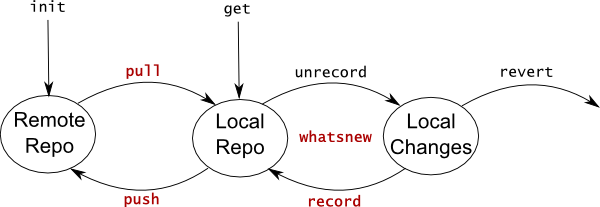
Basic Commands
I use four commands daily, shown in red on the above diagram, which are:
In addition to the four commands above, there are two additional basic commands that are used more rarely:
Creating Repos
Usually I work with existing repos, but it's useful to know how to create new repos:
Advanced Commands
These commands are useful to correct mistakes, but they aren't essential - you can do everything you need without them.
Collaboration Commands
If you are accepting occasional contributions from other people, you will need the following commands:
Conclusion
Effective use of darcs requires only a few simple commands, with only a few command line switches. This guide includes all the commands I ever use. Darcs rarely surprises me, and I think it is a suitable version control system for people who are familiar with the command line, but aren't computer experts.
Darcs is my favourite version control system because of its simple user interface. I am able to do everything I need with a handful of simple commands. I work with darcs as a single user, without branches, occasionally accepting small external contributions. This guide is designed to provide a sufficient reference for a someone who isn't a computer expert to continue using Darcs after their friendly comp-sci has set up the SSH bits for them (e.g. my wife).
A Darcs repository (or repo) is a set of changes (sometimes referred to as patches). There are three places changes may live:
- Remote Repo, such as on community.haskell.org.
- Local Repo, on your computer. You may have many local repos all using the same remote repo, especially if you use multiple computers.
- Local Changes, modifications you have made to your local repo, by editing files.
The way changes move between locations is described by:
Basic Commands
I use four commands daily, shown in red on the above diagram, which are:
- darcs pull - copy changes from the remote repo to your local repo. Use pull at the beginning of the day, and during the day if you are sharing a remote repo with other people.
- darcs whatsnew - see what local changes you have made. A useful flag is --summary, which lists only the names of files which have changed.
- darcs record - after you have decided to keep your changes, use record to store them in your local repo.
- darcs push --no-set-default ndm@code.haskell.org:/srv/code/hoogle - at the end of the day use push to move your changes to the remote repo. This command is the most tricky to use, you need SSH access to the server and need to use the file path of the repo, not the URL exposed by the website. I recommend writing a .bat file to automate this command, or using the neil push command if appropriate.
In addition to the four commands above, there are two additional basic commands that are used more rarely:
- darcs add filename - tell darcs that you have created a new file that should be kept in the repo. If you forget to add a file, darcs will not store it for you.
- darcs mv oldname newname - rename a file stored in darcs. Use this command instead of directly renaming the file using a file explorer.
Creating Repos
Usually I work with existing repos, but it's useful to know how to create new repos:
- darcs init - create an empty remote repo, with no changes in it. This command is usually run on the server.
- darcs get http://code.haskell.org/hoogle - create a new local repo based on a remote repo.
Advanced Commands
These commands are useful to correct mistakes, but they aren't essential - you can do everything you need without them.
- darcs revert - undo local changes that have not yet been recorded.
- darcs unrecord - undo a previous record command. Do not unrecord if you have pushed the changes, or have done substantial work since the initial record. Instead, manually create a new change undoing the previous record, and record that.
Collaboration Commands
If you are accepting occasional contributions from other people, you will need the following commands:
- darcs send -o filename.patch - make a file containing all the changes in your local repo, but not in the remote repo. This file can be emailed to other people.
- darcs apply filename.patch - apply a set of changes sent to you by email.
Conclusion
Effective use of darcs requires only a few simple commands, with only a few command line switches. This guide includes all the commands I ever use. Darcs rarely surprises me, and I think it is a suitable version control system for people who are familiar with the command line, but aren't computer experts.
Sunday, March 20, 2011
Experience Report: Functional Programming through Deep Time
My wife has just completed a draft of the experience report she's intending to submit to ICFP 2011. It's called Functional Programming through Deep Time:
I initially persuaded my wife to switch to Haskell, but since then, I have had little involvement with her code. If you have any feedback for her (ideally before Wednesday!) please leave it in the comments.
This experience report describes how Haskell was used to model the beginnings of complex life on Earth. My work combines ecological modeling in Haskell with statistical analysis in R, to answer some long standing paleontological questions. For my work, I found that neither Haskell nor R was suffcient - statistical analysis in Haskell is overly burdensome, while R lacks the structure to express complex algorithms in a maintainable manner. The reaction from my colleagues has ranged from indifferent to excited - but I have yet to tempt any of them over to the pure side!
I initially persuaded my wife to switch to Haskell, but since then, I have had little involvement with her code. If you have any feedback for her (ideally before Wednesday!) please leave it in the comments.
Sunday, March 13, 2011
Hoogle for your language (i.e. F#, Scala, ML, Clean...)
Summary: If you offer to help, I'll make Hoogle search your statically typed functional language.
Hoogle is a search engine for Haskell functions, that allows you to search by either name, or by type. But very little of Hoogle is actually Haskell specific - most is applicable to any language with a Hindley-Milner based type system.
Recently I have been asked by several people what they can do to allow Hoogle to search their preferred language. There are four steps to integrating a language with Hoogle, detailed below. If you are interested in helping please email me - I already have volunteers for both F# and Scala, but additional volunteers for other languages are welcome.
To allow searching a language from Hoogle, there are four steps:
1) A volunteer needs to generate some Hoogle input files containing details of the modules/functions/packages etc. to be searched. These files should be plain text, but can be in a language specific format - i.e. ML syntax for type signatures. For a rough idea of how these files could look see this example - for Haskell I get these files from Hackage. The code to generate these input files can be written in any language, and can live outside Hoogle.
2) Someone needs to write a parser that converts these language specific inputs into internal Hoogle representations. The equivalent code for Haskell is in the Hoogle repo. If a volunteer writes this code, I'll happily use it. If I have to write this code then that's OK, although I might take a bit longer. This code needs to be written in Haskell and live inside Hoogle.
At this stage, Hoogle will be able to search the new language. The remaining stages will just make the experience more pleasant.
3) Someone needs to write a query parser for the language, inside Hoogle. I may do this, as I'm intending to rewrite the Haskell query parser anyway, and I could probably find some savings by doing them together. This code needs to be written in Haskell and live inside Hoogle.
4) A volunteer would be useful to keep the function definitions up to date, generate new definitions, and ensure they get uploaded.
Email me if you want to volunteer!
Hoogle is a search engine for Haskell functions, that allows you to search by either name, or by type. But very little of Hoogle is actually Haskell specific - most is applicable to any language with a Hindley-Milner based type system.
Recently I have been asked by several people what they can do to allow Hoogle to search their preferred language. There are four steps to integrating a language with Hoogle, detailed below. If you are interested in helping please email me - I already have volunteers for both F# and Scala, but additional volunteers for other languages are welcome.
To allow searching a language from Hoogle, there are four steps:
1) A volunteer needs to generate some Hoogle input files containing details of the modules/functions/packages etc. to be searched. These files should be plain text, but can be in a language specific format - i.e. ML syntax for type signatures. For a rough idea of how these files could look see this example - for Haskell I get these files from Hackage. The code to generate these input files can be written in any language, and can live outside Hoogle.
2) Someone needs to write a parser that converts these language specific inputs into internal Hoogle representations. The equivalent code for Haskell is in the Hoogle repo. If a volunteer writes this code, I'll happily use it. If I have to write this code then that's OK, although I might take a bit longer. This code needs to be written in Haskell and live inside Hoogle.
At this stage, Hoogle will be able to search the new language. The remaining stages will just make the experience more pleasant.
3) Someone needs to write a query parser for the language, inside Hoogle. I may do this, as I'm intending to rewrite the Haskell query parser anyway, and I could probably find some savings by doing them together. This code needs to be written in Haskell and live inside Hoogle.
4) A volunteer would be useful to keep the function definitions up to date, generate new definitions, and ensure they get uploaded.
Email me if you want to volunteer!
Sunday, February 13, 2011
Corner Cases And Zero (and how WinForms gets it wrong)
Summary: Zero is a perfectly good number and functions should deal with it sensibly. In WinForms, both the Bitmap object and the DrawToBitmap function fail on zero, which is wrong. Functional programming (and recursion) make it harder to get the corner cases wrong.
Lots of programming is about reusing existing functions/objects. Many types have natural corner cases, e.g. an empty string, the number zero, and an array with zero elements. If the functions you reuse don't deal sensibly with corner cases your functions are likely to contain bugs, or be more verbose in working around other peoples bugs.
C#/WinForms has bugs with zero
Let's write a function in C#/WinForms which given a Control (something that can be displayed) produces a Bitmap of how it will be drawn:
Our function Draw makes use of the existing WinForms function DrawToBitmap:
The function DrawToBitmap draws the control into bitmap at the position specified by bounds. This function is useful, but impure (it mutates the bitmap argument), and somewhat fiddly (bounds have to satisfy various invariants with respect to the bitmap and the control). Our Draw function only handles the common case where you want the entire bitmap, but is pure and simpler. (Our Draw function can be renamed DrawToBitmap and added as an extension method of Control, making it quite convenient to use.)
Unfortunately our Draw function has a bug, due to the incorrect handling of zero in the functions we rely on. Let's consider a control with width 0, and height 10. First we crash with the exception "Parameter is not valid." when executing:
Unfortunately the .NET Bitmap type doesn't allow bitmaps which don't contain any pixels. This limitation probably comes from the CreateBitmap Win32 API function, which doesn't allow empty bitmaps. The result is that our function cannot return a 0x10 bitmap, meaning that lots of nice properties (e.g. the resulting bitmap will be the same size as the control) are necessarily violated. We can patch around the limitations of Bitmap by writing:
This change is horrid, but it's the best we can do within the limitations of the .NET Bitmap type. We run again and now get the exception "targetbounds" when executing:
Unfortunately DrawToBitmap throws an exception when either the width or height of the bounds is zero. We have to add another workaround to avoid calling DrawToBitmap in these cases (or at this stage perhaps just add an if at the top which returns early if either dimension is 0). The Bitmap limitation is annoying but somewhat understandable - it is driven by legacy code. However, DrawToBitmap could easily have been modified to accept 0 width or height and simply avoid doing anything, which would be the only sensible behaviour at this corner case.
The problem with bugs in corner cases is that they propagate. Bitmap has a limitation, so everything which uses Bitmap inherits this limitation. The DrawToControl function has a bug, so everything built on top of it has a bug (or needs to include a workaround). The documentation for Bitmap and DrawToControl doesn't mention that they fail at corner cases, which is unfortunate.
Induction for Corner Cases
One of the advantages of functional programming is that defining functions recursively forces you to consider corner cases. Consider the Haskell function replicate, which takes a number and a value, and repeats the value that number of times. To define the function it is natural to use recursion over the number. This scheme leads to the definition:
The function replicate 0 'x' returns []. To get the corner case wrong would have required additional effort. As a result, most Haskell functions work the way you would expect in corner cases - and consequently functions built from them also work sensibly in corner cases. When programming in Haskell my code is less likely to fail in corner cases, and more likely to work first time.
Exercise
As a final thought exercise, consider the following function:
Where orAnd [[a,b],[c,d]] returns True if either both a and b are True, or if both c and d are True. What should [] return? What should [[]] return? If you write this function recursively (or on top of other recursive functions such as or/and) there will be a natural answer. Writing the function imperatively makes it hard to ensure the corner cases are correct.
Lots of programming is about reusing existing functions/objects. Many types have natural corner cases, e.g. an empty string, the number zero, and an array with zero elements. If the functions you reuse don't deal sensibly with corner cases your functions are likely to contain bugs, or be more verbose in working around other peoples bugs.
C#/WinForms has bugs with zero
Let's write a function in C#/WinForms which given a Control (something that can be displayed) produces a Bitmap of how it will be drawn:
public Bitmap Draw(Control c)
{
    Bitmap bmp = new Bitmap(c.Width, c.Height);
    c.DrawToBitmap(bmp, new Rectangle(0, 0, c.Width, c.Height));
    return bmp;
}
Our function Draw makes use of the existing WinForms function DrawToBitmap:
void Control.DrawToBitmap(Bitmap bitmap, Rectangle bounds)
The function DrawToBitmap draws the control into bitmap at the position specified by bounds. This function is useful, but impure (it mutates the bitmap argument), and somewhat fiddly (bounds have to satisfy various invariants with respect to the bitmap and the control). Our Draw function only handles the common case where you want the entire bitmap, but is pure and simpler. (Our Draw function can be renamed DrawToBitmap and added as an extension method of Control, making it quite convenient to use.)
Unfortunately our Draw function has a bug, due to the incorrect handling of zero in the functions we rely on. Let's consider a control with width 0, and height 10. First we crash with the exception "Parameter is not valid." when executing:
new Bitmap(0, 10);
Unfortunately the .NET Bitmap type doesn't allow bitmaps which don't contain any pixels. This limitation probably comes from the CreateBitmap Win32 API function, which doesn't allow empty bitmaps. The result is that our function cannot return a 0x10 bitmap, meaning that lots of nice properties (e.g. the resulting bitmap will be the same size as the control) are necessarily violated. We can patch around the limitations of Bitmap by writing:
Bitmap bmp = new Bitmap(Math.Max(1, c.Width), Math.Max(1, c.Height));
This change is horrid, but it's the best we can do within the limitations of the .NET Bitmap type. We run again and now get the exception "targetbounds" when executing:
c.DrawToBitmap(bmp, new Rectangle(0, 0, 0, 10));
Unfortunately DrawToBitmap throws an exception when either the width or height of the bounds is zero. We have to add another workaround to avoid calling DrawToBitmap in these cases (or at this stage perhaps just add an if at the top which returns early if either dimension is 0). The Bitmap limitation is annoying but somewhat understandable - it is driven by legacy code. However, DrawToBitmap could easily have been modified to accept 0 width or height and simply avoid doing anything, which would be the only sensible behaviour at this corner case.
The problem with bugs in corner cases is that they propagate. Bitmap has a limitation, so everything which uses Bitmap inherits this limitation. The DrawToControl function has a bug, so everything built on top of it has a bug (or needs to include a workaround). The documentation for Bitmap and DrawToControl doesn't mention that they fail at corner cases, which is unfortunate.
Induction for Corner Cases
One of the advantages of functional programming is that defining functions recursively forces you to consider corner cases. Consider the Haskell function replicate, which takes a number and a value, and repeats the value that number of times. To define the function it is natural to use recursion over the number. This scheme leads to the definition:
replicate 0 x = []
replicate n x = x : replicate (n-1) x
The function replicate 0 'x' returns []. To get the corner case wrong would have required additional effort. As a result, most Haskell functions work the way you would expect in corner cases - and consequently functions built from them also work sensibly in corner cases. When programming in Haskell my code is less likely to fail in corner cases, and more likely to work first time.
Exercise
As a final thought exercise, consider the following function:
orAnd :: [[Bool]] -> Bool
Where orAnd [[a,b],[c,d]] returns True if either both a and b are True, or if both c and d are True. What should [] return? What should [[]] return? If you write this function recursively (or on top of other recursive functions such as or/and) there will be a natural answer. Writing the function imperatively makes it hard to ensure the corner cases are correct.
Sunday, January 23, 2011
Hoogle Embed
Summary: Hoogle Embed lets you include a small interactive Hoogle search box on your web page.
I have just released Hoogle 4.2, which adds the feature Hoogle Embed, letting you embed a small Hoogle powered search box on any web page. For an example, visit the Hoogle page on my website, and try typing "database" in the search box on the right. You should see:

As you type, the search box will perform Hoogle searches on the Hoogle API, and display the results. Selecting a result will visit the associated documentation. Pressing the Search button will perform the search at the Hoogle website.
Using Hoogle Embed in your web page
To include Hoogle Embed on a web page, simply add the following piece of HTML:
To use a different Hoogle server change the action field of the form. To specify a prefix/suffix for all searches add an input field with the name prefix/suffix. For example, the above snippet only searches the base pacakge. By eliminating the prefix line it will search using the default Hoogle settings (the Haskell platform).
The Hoogle Embed feature is usable on any web page, but I think would be particularly effective on pages such as the Hackage page for a package, or for any Haddock documentation (perhaps when using a flag such as --hoogle-embed). I encourage anyone who is interested to submit patches to the relevant projects.
Hoogle Manual
I am currently considering the issue of documentation, and would welcome other peoples thoughts. Currently the Hoogle manual is hosted on the Haskell Wiki, but is somewhat out of date. For all other packages, I tend to write an HTML manual stored in the darcs repo, such as for hlint. There are advantages to both formats - the wiki can be easily edited by many people, but the darcs manual can be updated simultaneously with the code and is available offline (most Hoogle work is done on a train without internet access, so this issue is very relevant). My current thought is to remove the wiki page and move it's contents into darcs.
Edit: Fixed the Javascript links.
Edit 2: Hoogle Embed now works cross domain in IE 8 and above.
I have just released Hoogle 4.2, which adds the feature Hoogle Embed, letting you embed a small Hoogle powered search box on any web page. For an example, visit the Hoogle page on my website, and try typing "database" in the search box on the right. You should see:
As you type, the search box will perform Hoogle searches on the Hoogle API, and display the results. Selecting a result will visit the associated documentation. Pressing the Search button will perform the search at the Hoogle website.
- Hoogle Embed has been tested in Chrome, Firefox and IE.
Using IEUsing IE 7 or below you may not see results unless the page being displayed is on the same server as the Hoogle instance (i.e. haskell.org), due to restrictions on cross domain AJAX requests. This limitation can probably be overcome with additional work, if people are interested. - Hoogle Embed degrades gracefully if the browser does not support Javascript, leaving just the search box.
- Configuration options allow you to automatically add a prefix or suffix to the users search, for example adding +hoogle to search only the Hoogle API.
- This feature works with either a custom Hoogle instance, or the standard version on haskell.org.
Using Hoogle Embed in your web page
To include Hoogle Embed on a web page, simply add the following piece of HTML:
<script type="text/javascript" src="http://haskell.org/hoogle/datadir/resources/jquery-1.4.2.js"></script>
<script type="text/javascript" src="http://haskell.org/hoogle/datadir/resources/hoogle.js"></script>
<form action="http://haskell.org/hoogle/" method="get">
  <input type="text"   name="hoogle" id="hoogle" accesskey="1" />
  <input type="hidden" name="prefix" value="+base" />
  <input type="submit" value="Search" />
</form>
To use a different Hoogle server change the action field of the form. To specify a prefix/suffix for all searches add an input field with the name prefix/suffix. For example, the above snippet only searches the base pacakge. By eliminating the prefix line it will search using the default Hoogle settings (the Haskell platform).
The Hoogle Embed feature is usable on any web page, but I think would be particularly effective on pages such as the Hackage page for a package, or for any Haddock documentation (perhaps when using a flag such as --hoogle-embed). I encourage anyone who is interested to submit patches to the relevant projects.
Hoogle Manual
I am currently considering the issue of documentation, and would welcome other peoples thoughts. Currently the Hoogle manual is hosted on the Haskell Wiki, but is somewhat out of date. For all other packages, I tend to write an HTML manual stored in the darcs repo, such as for hlint. There are advantages to both formats - the wiki can be easily edited by many people, but the darcs manual can be updated simultaneously with the code and is available offline (most Hoogle work is done on a train without internet access, so this issue is very relevant). My current thought is to remove the wiki page and move it's contents into darcs.
Edit: Fixed the Javascript links.
Edit 2: Hoogle Embed now works cross domain in IE 8 and above.
Sunday, January 16, 2011
Hoogle At 1.7 Million Searches
Summary: I detail some of the changes in today's Hoogle release; I outline future plans for Hoogle; I plot some statistics, noting that Hoogle has been used for 1.7 million searches.
New Features
Hoogle is a Haskell API search engine, which I've been working on since 2004. Today I updated the web version at http://haskell.org/hoogle, and uploaded a new version to Hackage. Since my last release I've been working on several new features:
Future Plans
There are three big improvements I plan to make to Hoogle:
Statistics
Hoogle logs the date and contents of each search, but stores no personally identifiable information. These statistics all relate to the number of searches made, not including blank searches or suggestions offered by the Firefox search plugin. In the time between adding a logging facility, and making it log the date (2009-Apr-24), there were 631930 searches. Since then there have been at least 1012414 searches, not taking into account about a month where logging was disabled. Generally, searches range between 1000 and 2500 a day.

New Features
Hoogle is a Haskell API search engine, which I've been working on since 2004. Today I updated the web version at http://haskell.org/hoogle, and uploaded a new version to Hackage. Since my last release I've been working on several new features:
- Instant Search - in the top right corner you will see a link entitled "Instant is off". Click that link to turn instant search on, and then searches will be performed as you type. This feature is still experimental, but I already rely on it for my searches.
- Visual Refresh - I've modified the style and layout, trying to improve the general feel, especially when used in conjunction with instant search. I added links to make the package filtering options more accessible and I collapse identical results available from different modules.
- Database Update - thanks to Ian Lynagh and Ross Paterson I've been able to update all the Hoogle databases, including for the base package. In the future I hope to keep Hoogle continuously updated.
Future Plans
There are three big improvements I plan to make to Hoogle:
- Better Data - Hoogle relies on data from Haddock, uploaded to Hackage, by Cabal. This release improves the data, but there are still further improvements to be made. There are several bugs in Haddock, and data for the base library is not yet available on Hackage. If Hoogle could integrate more closely with Cabal then Hoogle could search users local packages. Many of these problems require coordination between several projects, and any offers of help would be welcome. Some bugs: #80, #11, #339, #60, #183.
- Better Search Syntax - the search syntax in Hoogle is acceptable, but isn't that close to other search engines, doesn't always mesh well with instant search and has a number of bugs. I intend to overhaul the search syntax, hopefully improving the feel of Hoogle. Some bugs: #34, #61, #398, #130.
- Improved Database/Searching - type search needs to execute faster and give better results. By executing faster Hoogle will be able to search the whole of Hackage at once. Hoogle has gone through four entirely different iterations of type search already, and I have a design for the fifth version. Some bugs: #79, #324, #30, #336, #381.
Statistics
Hoogle logs the date and contents of each search, but stores no personally identifiable information. These statistics all relate to the number of searches made, not including blank searches or suggestions offered by the Firefox search plugin. In the time between adding a logging facility, and making it log the date (2009-Apr-24), there were 631930 searches. Since then there have been at least 1012414 searches, not taking into account about a month where logging was disabled. Generally, searches range between 1000 and 2500 a day.
Sunday, December 19, 2010
New Version of Hoogle (4.1)
I've just released a new version of Hoogle to both Hackage and to haskell.org/hoogle. Hoogle is a Haskell search engine that allows you to search for functions by either name or approximate type signature.
What's New
Searching all of Hackage
Hoogle can now search all of Hackage. By default it will search the Haskell Platform, but you can search additional packages using +package-name, for example +tagsoup Tag a -> Bool. You can search both the platform and additional packages by including +default, for example ([a] -> (b, [a])) -> [a] -> [b] +split +default.
I'm still not sure what should be searched by default, and which collections of modules should be available, but I'm open to suggestions.
Installing Hoogle Locally
Many of the improvements to Hoogle are of specific benefit when installing Hoogle yourself, not using the web version. To install Hoogle:
The last step will download information and generate databases for the Haskell Platform. You can then run searches, such as hoogle filter -n10. Hoogle now uses cmdargs, so hoogle --help will detail some of the options available.
You can also run Hoogle as a web server by typing hoogle server. Now visit localhost in a web browser and you'll have the power of Hoogle on your computer. If you often work offline, you can run hoogle data --local and hoogle server --local to use documentation on your local machine where available.
What Now?
Hoogle is currently the spare time project I'm focusing on - there are lots of improvements I am intending to make. Hoogle 4.1 is about getting the code up to a standard that can be easily maintained, allowing future versions to deliver more features. Please try out Hoogle, report any bugs you find, and let me know your thoughts.
What's New
- The first release in over a year, building with up to date packages and compilers.
- Up to date library definitions for all of Hackage.
- Searches the Haskell Platform by default.
- Significant improvements when installing Hoogle locally.
- Lots of additional small improvements.
Searching all of Hackage
Hoogle can now search all of Hackage. By default it will search the Haskell Platform, but you can search additional packages using +package-name, for example +tagsoup Tag a -> Bool. You can search both the platform and additional packages by including +default, for example ([a] -> (b, [a])) -> [a] -> [b] +split +default.
I'm still not sure what should be searched by default, and which collections of modules should be available, but I'm open to suggestions.
Installing Hoogle Locally
Many of the improvements to Hoogle are of specific benefit when installing Hoogle yourself, not using the web version. To install Hoogle:
cabal update
cabal install hoogle
hoogle data
The last step will download information and generate databases for the Haskell Platform. You can then run searches, such as hoogle filter -n10. Hoogle now uses cmdargs, so hoogle --help will detail some of the options available.
You can also run Hoogle as a web server by typing hoogle server. Now visit localhost in a web browser and you'll have the power of Hoogle on your computer. If you often work offline, you can run hoogle data --local and hoogle server --local to use documentation on your local machine where available.
What Now?
Hoogle is currently the spare time project I'm focusing on - there are lots of improvements I am intending to make. Hoogle 4.1 is about getting the code up to a standard that can be easily maintained, allowing future versions to deliver more features. Please try out Hoogle, report any bugs you find, and let me know your thoughts.
Sunday, December 12, 2010
Installing the Haskell network library on Windows
Summary: This post describes how to install the Haskell network library on Windows.
Update 2016: My current approach is here.
The network library used to be bundled with GHC. Unfortunately it was unbundled from the standard installer (in my opinion, a mistake), and people were required to either install it using Cabal (rather tricky) or switch to using the Haskell Platform (which is not suitable for power developers who want to test with newer/older GHC versions, or those who want to upgrade/downgrade network). This post describes how to install the library on Windows using Cabal.
First, install Cygwin. I selected lots of options (configure tools, auto conf, compilers) - but I'm not sure which are necessary.
Then start a Cygwin window and run:
WHICHGHC=`which ghc` && PATH=`dirname $WHICHGHC`/../mingw/bin:$PATH && cabal install network --configure-option --host=i386-unknown-mingw32 --global --enable-library-profiling
This configures network to use mingw32, and sets up the PATH so that mingw binaries from GHC are first, and get configured in. You can then use the network library as normal, without ever using Cygwin again. I have successfully executed this command on GHC 6.12.3 and 7.0.1.
Dependencies on foreign libraries are a problem for any cross platform language. Several years ago, installing Haskell libraries was a painful process - but Hackage and Cabal have made it impressively easy. The only remaining packages that are complex to install are those that bind to foreign libraries, most of which use configure scripts, which are not well suited to Windows. I hope over time even libraries with foreign dependencies will become easy to install.
Update: Ivan Perez suggests the alternative form:
Update 2016: My current approach is here.
The network library used to be bundled with GHC. Unfortunately it was unbundled from the standard installer (in my opinion, a mistake), and people were required to either install it using Cabal (rather tricky) or switch to using the Haskell Platform (which is not suitable for power developers who want to test with newer/older GHC versions, or those who want to upgrade/downgrade network). This post describes how to install the library on Windows using Cabal.
First, install Cygwin. I selected lots of options (configure tools, auto conf, compilers) - but I'm not sure which are necessary.
Then start a Cygwin window and run:
WHICHGHC=`which ghc` && PATH=`dirname $WHICHGHC`/../mingw/bin:$PATH && cabal install network --configure-option --host=i386-unknown-mingw32 --global --enable-library-profiling
This configures network to use mingw32, and sets up the PATH so that mingw binaries from GHC are first, and get configured in. You can then use the network library as normal, without ever using Cygwin again. I have successfully executed this command on GHC 6.12.3 and 7.0.1.
Dependencies on foreign libraries are a problem for any cross platform language. Several years ago, installing Haskell libraries was a painful process - but Hackage and Cabal have made it impressively easy. The only remaining packages that are complex to install are those that bind to foreign libraries, most of which use configure scripts, which are not well suited to Windows. I hope over time even libraries with foreign dependencies will become easy to install.
Update: Ivan Perez suggests the alternative form:
WHICHGHC=`which ghc` && PATH=`dirname $WHICHGHC`/../mingw/bin:$PATH && cabal install network --configure-option --build=i386-unknown-mingw32 --configure-option --host=i686-pc-cygwin --global --enable-library-profiling
Thursday, October 14, 2010
Enhanced Cabal SDist
Summary: I wrote a little script on top of cabal sdist that checks for common mistakes.
Cabal is the standard way to distribute Haskell packages, and has significantly simplified the process of installing libraries. However, I often make mistakes when creating cabal distributions using sdist. One common problem is that if you don't include a file in your .cabal file it will not be put in the distribution package and the package will fail to build for other people, but if the file is available locally it will still work for you. To work around this problem, I often perform a cabal install immediately after I upload a cabal package. Last week I discovered a package that I'd requested to be uploaded had suffered the same fate (hws – from the fantastic Haskell Workshop paper on writing a scalable web server in Haskell), showing this mistake isn't specific to me.
Eric Kow often says that programmers spend too little time writing tools to help their workflow. In response to this observation I have created the "neil" tool, available in darcs from http://community.haskell.org/~ndm/darcs/neil - darcs get and then cabal install. One feature of this neil tool is neil sdist. The actions neil sdist performs are:
The intention is that this sequence of actions will fail if anything bad would happen on a users machine. If the file fails to build then cabal build will fail. If the haddock fails to generate than cabal haddock will fail. If there would be warnings during build then –Werror will cause it to fail. If all these checks pass then the package is likely to install without problems (once the cabal test feature is present then that can be included, which will give even more assurance).
I have deliberately not uploaded the neil tool to Hackage, and have no intention of doing so. The name "neil" is not suitable for Hackage, and I intend to add specific actions to help my workflow. If anyone wants to take any of the actions included in this tool and break them out in to separate tools, roll them back into cabal itself etc, they are very welcome.
Taking Eric's advice, I have found that by automating aspects of my workflow I can take steps which were error prone, or verbose, and make them concise and accurate. With neil sdist I have eliminated an entire class of potential errors, with very little ongoing work.
Cabal is the standard way to distribute Haskell packages, and has significantly simplified the process of installing libraries. However, I often make mistakes when creating cabal distributions using sdist. One common problem is that if you don't include a file in your .cabal file it will not be put in the distribution package and the package will fail to build for other people, but if the file is available locally it will still work for you. To work around this problem, I often perform a cabal install immediately after I upload a cabal package. Last week I discovered a package that I'd requested to be uploaded had suffered the same fate (hws – from the fantastic Haskell Workshop paper on writing a scalable web server in Haskell), showing this mistake isn't specific to me.
Eric Kow often says that programmers spend too little time writing tools to help their workflow. In response to this observation I have created the "neil" tool, available in darcs from http://community.haskell.org/~ndm/darcs/neil - darcs get and then cabal install. One feature of this neil tool is neil sdist. The actions neil sdist performs are:
- cabal check
- cabal configure to a temporary directory
- cabal sdist to a temporary directory
- change to that temporary directory
- cabal configure –Werror –fwarn-unused-imports
- cabal build
- cabal haddock –executables
The intention is that this sequence of actions will fail if anything bad would happen on a users machine. If the file fails to build then cabal build will fail. If the haddock fails to generate than cabal haddock will fail. If there would be warnings during build then –Werror will cause it to fail. If all these checks pass then the package is likely to install without problems (once the cabal test feature is present then that can be included, which will give even more assurance).
I have deliberately not uploaded the neil tool to Hackage, and have no intention of doing so. The name "neil" is not suitable for Hackage, and I intend to add specific actions to help my workflow. If anyone wants to take any of the actions included in this tool and break them out in to separate tools, roll them back into cabal itself etc, they are very welcome.
Taking Eric's advice, I have found that by automating aspects of my workflow I can take steps which were error prone, or verbose, and make them concise and accurate. With neil sdist I have eliminated an entire class of potential errors, with very little ongoing work.
Saturday, September 18, 2010
Three Closed GHC Bugs I Wish Were Open
Summary: I want three changes to the Haskell standard libraries. System.Info.isWindows should be added, Control.Monad.concatMapM should be added, and Control.Concurrent.QSem should work with negative quantities.
Over the last few hours I've been going through my inbox, trying to deal with some of my older emails. In that process, I've had to admit defeat on three GHC bugs that I'd left in my inbox to come back to. All these bugs relate to changes to the Haskell standard libraries, that were opened as bugs, and that got resolved as closed/wontfix. I will never get time to tackle these bugs, but perhaps someone will? The bugs are:
Add System.Info.isWindows - bug 1590
Currently the recognised way to test at runtime if your application is being run on Windows is:
This is wrong for many reasons:
The Haskell abstractions and command line tools for almost all non-Windows operating systems have converged to the point where most programs with operating system specific behaviour have two cases - one for Windows and one for everything else. It makes sense to directly support what is probably the most common usage of the os function, and to encourage people away from the C preprocessor where possible.
Add Control.Monad.concatMapM - bug 2042
I've personally defined this function in binarydefer, catch, derive, hlint, hoogle, my website generator and yhc. There's even a copy in GHC. If a function has been defined identically that many times, it clear deserves to be in the standard library. We have mapM, filterM, zipWithM, but concatMapM is suspiciously absent.
Make Control.Concurrent.QSem work with negatives - bug 3159
The QSem module defines a quantity semaphore, where the quantity semaphores must be natural numbers. Attempts to construct semaphores with negative numbers raise an error. There is, however, a perfectly sensible and obvious interpretation if negative numbers are allowed. It is a shame that this module could provide total functions, which never raise an error, but does not. In addition, for some problems the use of negative quantity semaphores is more natural.
What Now?
I've removed all these bugs from my inbox, and invite someone else to take up the cause - I just don't have the time. Until these issues are resolved, I will test for Windows in a horrible way, define concatMapM whenever I start a new project, and lament the lack of generality in QSem. None of the issues is particularly serious, but all are slightly annoying.
Email etiquette: Today I've cleared about 50 emails from my inbox. Unfortunately my inbox remains big and unwieldy. If you ever email me, and I don't get back to you, email me again a week later. As long as you reply to the first message, Gmail will collapse the reply in to the original conversation, and there won't be any additional load on my inbox - it will just remind me that I should have dealt with your email. I apologise for any emails that have fallen through the cracks.
Over the last few hours I've been going through my inbox, trying to deal with some of my older emails. In that process, I've had to admit defeat on three GHC bugs that I'd left in my inbox to come back to. All these bugs relate to changes to the Haskell standard libraries, that were opened as bugs, and that got resolved as closed/wontfix. I will never get time to tackle these bugs, but perhaps someone will? The bugs are:
Add System.Info.isWindows - bug 1590
module System.Info where

-- | Check if the operating system is a Windows derivative. Returns True on
--   all Windows systems (Win95, Win98 ... Vista, Win7), and False on all others
isWindows :: Bool
isWindows = os == "mingw"
Currently the recognised way to test at runtime if your application is being run on Windows is:
import System.Info

.... = os == "mingw"
This is wrong for many reasons:
- The return result of os is not an operating system, but a ported toolchain.
- The result "mingw" does not imply that MinGW is installed on the computer.
- String comparisons are unsafe and unchecked, a simple typo breaks this code.
- In GHC this comparison will take place at runtime, even though the result is a constant.
The Haskell abstractions and command line tools for almost all non-Windows operating systems have converged to the point where most programs with operating system specific behaviour have two cases - one for Windows and one for everything else. It makes sense to directly support what is probably the most common usage of the os function, and to encourage people away from the C preprocessor where possible.
Add Control.Monad.concatMapM - bug 2042
module Control.Monad where

-- | The 'concatMapM' function generalizes 'concatMap' to arbitrary monads.
concatMapM        :: (Monad m) => (a -> m [b]) -> [a] -> m [b]
concatMapM f xs   =  liftM concat (mapM f xs)
I've personally defined this function in binarydefer, catch, derive, hlint, hoogle, my website generator and yhc. There's even a copy in GHC. If a function has been defined identically that many times, it clear deserves to be in the standard library. We have mapM, filterM, zipWithM, but concatMapM is suspiciously absent.
Make Control.Concurrent.QSem work with negatives - bug 3159
The QSem module defines a quantity semaphore, where the quantity semaphores must be natural numbers. Attempts to construct semaphores with negative numbers raise an error. There is, however, a perfectly sensible and obvious interpretation if negative numbers are allowed. It is a shame that this module could provide total functions, which never raise an error, but does not. In addition, for some problems the use of negative quantity semaphores is more natural.
What Now?
I've removed all these bugs from my inbox, and invite someone else to take up the cause - I just don't have the time. Until these issues are resolved, I will test for Windows in a horrible way, define concatMapM whenever I start a new project, and lament the lack of generality in QSem. None of the issues is particularly serious, but all are slightly annoying.
Email etiquette: Today I've cleared about 50 emails from my inbox. Unfortunately my inbox remains big and unwieldy. If you ever email me, and I don't get back to you, email me again a week later. As long as you reply to the first message, Gmail will collapse the reply in to the original conversation, and there won't be any additional load on my inbox - it will just remind me that I should have dealt with your email. I apologise for any emails that have fallen through the cracks.
Monday, August 23, 2010
CmdArgs Example
Summary: A simple CmdArgs parser is incredibly simple (just a data type). A more advanced CmdArgs parser is still pretty simple (a few annotations). People shouldn't be using getArgs even for quick one-off programs.
A few days ago I went to the Haskell Hoodlums meeting - an event in London aimed towards people learning Haskell. The event was good fun, and very well organised - professional quality Haskell tutition for free by friendly people - the Haskell community really is one of Haskell's strengths! The final exercise was to write a program that picks a random number between 1 and 100, then has the user take guesses, with higher/lower hints. After writing the program, Ganesh suggested adding command line flags to control the minimum/maximum numbers. It's not too hard to do this directly with getArgs:
Next we discussed adding an optional limit on the number of guesses the user is allowed. It's certainly possible to extend the getArgs variant to take in a limit, but things are starting to get a bit ugly. If the user enters the wrong number of arguments they get a pattern match error. There is no help message to inform the user which flags the program takes. While getArgs is simple to start with, it doesn't have much flexibility, and handles errors very poorly. However, for years I used getArgs for all one-off programs - I found the other command line parsing libraries (including GetOpt) added too much overhead, and always required referring back to the documentation. To solve this problem I wrote CmdArgs.
A Simple CmdArgs Parser
To start using CmdArgs we first define a record to capture the information we want from the command line:
For our number guessing program we need a minimum, a maximum, and an optional limit. The deriving clause is required to operate with the CmdArgs library, and provides some basic reflection capabilities for this data type. Once we've written this data type, a CmdArgs parser is only one function call away:
Now we have a simple command line parser. Some sample interactions are:
Adding Features to CmdArgs
Our simple CmdArgs parser is probably sufficient for this task. I doubt anyone will be persuaded to use my guessing program without a fancy iPhone interface. However, CmdArgs provides all the power necessary to customise the parser, by adding annotations to the input value. First, we can modify the parser to make it easier to add our annotations:
We have changed Guess to use record syntax for constructing the values, which helps document what we are doing. We've also switched to using cmdArgsMode/cmdArgsRun (cmdArgs which is just a composition of those two functions) - this helps avoid any problems with capturing the annotations when running repeatedly in GHCi. Now we can add annotations to the guess value:
Here we've specified that min/max must be at argument position 0/1, which more closely matches the original getArgs parser - this means the user is always forced to enter a min/max (they could be made optional with the opt annotation). For the limit we've added a name annotation to say that we'd like the flag -n to map to limit, instead of using the default -l. We've also given limit some help text, which will be displayed with --help. Finally, we've given a different summary line to the program.
We can now interact with our new parser:
The Complete Program
For completeness sake, here is the complete program. I think for this program the most suitable CmdArgs parser is the simpler one initially written, which I have used here:
(The code in this post can be freely reused for any purpose, unless you are porting it to the iPhone, in which case I want 10% of all revenues.)
A few days ago I went to the Haskell Hoodlums meeting - an event in London aimed towards people learning Haskell. The event was good fun, and very well organised - professional quality Haskell tutition for free by friendly people - the Haskell community really is one of Haskell's strengths! The final exercise was to write a program that picks a random number between 1 and 100, then has the user take guesses, with higher/lower hints. After writing the program, Ganesh suggested adding command line flags to control the minimum/maximum numbers. It's not too hard to do this directly with getArgs:
import System.Environment

main = do
    [min,max] <- getArgs
    print (read min, read max)
Next we discussed adding an optional limit on the number of guesses the user is allowed. It's certainly possible to extend the getArgs variant to take in a limit, but things are starting to get a bit ugly. If the user enters the wrong number of arguments they get a pattern match error. There is no help message to inform the user which flags the program takes. While getArgs is simple to start with, it doesn't have much flexibility, and handles errors very poorly. However, for years I used getArgs for all one-off programs - I found the other command line parsing libraries (including GetOpt) added too much overhead, and always required referring back to the documentation. To solve this problem I wrote CmdArgs.
A Simple CmdArgs Parser
To start using CmdArgs we first define a record to capture the information we want from the command line:
data Guess = Guess {min :: Int, max :: Int, limit :: Maybe Int} deriving (Data,Typeable,Show)
For our number guessing program we need a minimum, a maximum, and an optional limit. The deriving clause is required to operate with the CmdArgs library, and provides some basic reflection capabilities for this data type. Once we've written this data type, a CmdArgs parser is only one function call away:
{-# LANGUAGE DeriveDataTypeable #-}
import System.Console.CmdArgs

data Guess = Guess {min :: Int, max :: Int, limit :: Maybe Int} deriving (Data,Typeable,Show)

main = do
    x <- cmdArgs $ Guess 1 100 Nothing
    print x
Now we have a simple command line parser. Some sample interactions are:
$ guess --min=10
NumberGuess {min = 10, max = 100, limit = Nothing}

$ guess --min=10 --max=1000
NumberGuess {min = 10, max = 1000, limit = Nothing}

$ guess --limit=5
NumberGuess {min = 1, max = 100, limit = Just 5}

$ guess --help
The guess program

guess [OPTIONS]

  -? --help       Display help message
  -V --version    Print version information
     --min=INT
     --max=INT
  -l --limit=INT
Adding Features to CmdArgs
Our simple CmdArgs parser is probably sufficient for this task. I doubt anyone will be persuaded to use my guessing program without a fancy iPhone interface. However, CmdArgs provides all the power necessary to customise the parser, by adding annotations to the input value. First, we can modify the parser to make it easier to add our annotations:
guess = cmdArgsMode $ Guess {min = 1, max = 100, limit = Nothing}

main = do
    x <- cmdArgsRun guess
    print x
We have changed Guess to use record syntax for constructing the values, which helps document what we are doing. We've also switched to using cmdArgsMode/cmdArgsRun (cmdArgs which is just a composition of those two functions) - this helps avoid any problems with capturing the annotations when running repeatedly in GHCi. Now we can add annotations to the guess value:
guess = cmdArgsMode $ Guess
    {min = 1   &= argPos 0 &= typ "MIN"
    ,max = 100 &= argPos 1 &= typ "MAX"
    ,limit = Nothing &= name "n" &= help "Limit the number of choices"}
    &= summary "Neil's awesome guessing program"
Here we've specified that min/max must be at argument position 0/1, which more closely matches the original getArgs parser - this means the user is always forced to enter a min/max (they could be made optional with the opt annotation). For the limit we've added a name annotation to say that we'd like the flag -n to map to limit, instead of using the default -l. We've also given limit some help text, which will be displayed with --help. Finally, we've given a different summary line to the program.
We can now interact with our new parser:
$ guess
Requires at least 2 arguments, got 0

$ guess 1 100
Guess {min = 1, max = 100, limit = Nothing}

$ guess 1 100 -n4
Guess {min = 1, max = 100, limit = Just 4}

$ guess -?
Neil's awesome guessing program

guess [OPTIONS] MIN MAX

  -? --help       Display help message
  -V --version    Print version information
  -n --limit=INT  Limit the number of choices
The Complete Program
For completeness sake, here is the complete program. I think for this program the most suitable CmdArgs parser is the simpler one initially written, which I have used here:
{-# LANGUAGE DeriveDataTypeable, RecordWildCards #-}

import System.Random
import System.Console.CmdArgs

data Guess = Guess {min :: Int, max :: Int, limit :: Maybe Int} deriving (Data,Typeable)

main = do
    Guess{..} <- cmdArgs $ Guess 1 100 Nothing
    answer <- randomRIO (min,max)
    game limit answer

game (Just 0) answer = putStrLn "Limit exceeded"
game limit answer = do
    putStr "Have a guess: "
    guess <- fmap read getLine
    if guess == answer then
        putStrLn "Awesome!!!1"
     else do
        putStrLn $ if guess > answer then "Too high" else "Too low"
        game (fmap (subtract 1) limit) answer
(The code in this post can be freely reused for any purpose, unless you are porting it to the iPhone, in which case I want 10% of all revenues.)
Monday, August 16, 2010
CmdArgs 0.2 - command line argument processing
I've just released CmdArgs 0.2 to Hackage. CmdArgs is a library for defining and parsing command lines. The focus of CmdArgs is allowing the concise definition of fully-featured command line argument processors, in a mainly declarative manner (i.e. little coding needed). CmdArgs also supports multiple mode programs, as seen in darcs and Cabal. For some examples of CmdArgs, please see the manual or the Haddock documentation.
For the last month I've been working on a complete rewrite of CmdArgs. The original version of CmdArgs did what I was hoping it would - it was concise and easy to use. However, CmdArgs 0.1 had lots of rough edges - some features didn't work together, there were lots of restrictions on which types of fields appear where, and it was hard to add new features. CmdArgs 0.2 is a ground up rewrite which is designed to make it easy to maintain and improve in the future.
The CmdArgs 0.2 API is incompatible with CmdArgs 0.1, for which I apologise. Some of the changes you will notice:
All the basic principles have remained the same, all the old features have been retained, and translating parsers should be simple local tweaks. If you need any help please contact me.
Explicit Command Line Processor
The biggest change is the introduction of an explicit command line framework in System.Console.CmdArgs.Explicit. CmdArgs 0.1 is an implicit command line parser - you define a value with annotations from which a command line parser is inferred. Unfortunately there was not complete separation between determining what parser the user was hoping to define, and then executing it. The result was that even at the flag processing stage there were still complex decisions being made based on type. CmdArgs 0.2 has a fully featured explicit parser that can be used separately, which can process command line flags and display help messages. Now the implicit parser first translates to the explicit parser (capturing the users intentions), then executes it. The advantages of having an explicit parser are substantial.
The introduction of the explicit parser was a great idea, and has dramatically improved CmdArgs. However, there are still some loose ends. The translation from implicit to explicit is a multi-stage translation, where each stage infers some additional information. While this process works, it is not very direct - the semantics of an annotation are hard to determine, and there are ordering constrains on these stages. It would be much better if I could concisely and directly express the semantics of the annotations, which is something I will be thinking about for CmdArgs 0.3.
GetOpt Compatibility
While the intention is that CmdArgs users write implicit parsers, it is not required. It is perfectly possible to write explicit parsers directly, and benefit from the argument processing and help text generation. Alternatively, it is possible to define your own command line framework, which is then translated in to an explicit parser. CmdArgs 0.2 now includes a GetOpt translator, which presents an API compatible with GetOpt, but operates by translating to an explicit parser. I hope that other people writing command line frameworks will consider reusing the explicit parser.
Capturing Annotations
As part of the enhanced separation of CmdArgs, I have extracted all the code that captures annotations, and made it more robust. The essential operation is now &= which takes a value and attaches an annotation. (x &= a) &= b can then be used to attach the two annotations a and b (the brackets are optional). Previously the capturing of annotations and processing of flags was interspersed, meaning the entire library was impure - now all impure operations are performed inside capture. The capturing framework is not fully generic (that would require module functors, to parameterise over the type of annotation), but otherwise is entirely separate.
Consistentency
One of the biggest changes for users should be the increase in consistency. In CmdArgs 0.1 certain annotations were bound to certain types - the args annotation had to be on a [String] field, the argPos annotation had to be on String. In the new version any field can be a list or a maybe, of any atomic type - including Bool, Int/Integer, Double/Float and tuples of atomic types. With this support it's trivial to write:
Now you can run:
Hopefully this increase in consistency will make CmdArgs much more predictable for users.
Help Output
The one thing I'm still wrestling with is the help output. While the help output is reasonably straightforward for single mode programs, I am still undecided how multiple mode programs should be displayed. Currently CmdArgs displays something I think is acceptable, but not optimal. I am happy to take suggestions for how to improve the help output.
Conclusion
CmdArgs 0.1 was an experiment - is it possible to define concise command line argument processors? The result was a working library, but whose potential for enhancement was limited by a lack of internal separation. CmdArgs 0.2 is a complete rewrite, designed to put the ideas from CmdArgs 0.2 into practical use, and allow lots of scope for further improvements. I hope CmdArgs will become the standard choice for most command line processing tasks.
For the last month I've been working on a complete rewrite of CmdArgs. The original version of CmdArgs did what I was hoping it would - it was concise and easy to use. However, CmdArgs 0.1 had lots of rough edges - some features didn't work together, there were lots of restrictions on which types of fields appear where, and it was hard to add new features. CmdArgs 0.2 is a ground up rewrite which is designed to make it easy to maintain and improve in the future.
The CmdArgs 0.2 API is incompatible with CmdArgs 0.1, for which I apologise. Some of the changes you will notice:
- Several of the annotations have changed name (text has become help, empty has become opt).
- Instead of writing annotations value &= a1 & a2, you write value &= a1 &= a2.
- Instead of cmdArgs "Summary" [mode1], you write cmdArgs (mode1 &= summary "Summary"). If you need a multi mode program use the modes function.
All the basic principles have remained the same, all the old features have been retained, and translating parsers should be simple local tweaks. If you need any help please contact me.
Explicit Command Line Processor
The biggest change is the introduction of an explicit command line framework in System.Console.CmdArgs.Explicit. CmdArgs 0.1 is an implicit command line parser - you define a value with annotations from which a command line parser is inferred. Unfortunately there was not complete separation between determining what parser the user was hoping to define, and then executing it. The result was that even at the flag processing stage there were still complex decisions being made based on type. CmdArgs 0.2 has a fully featured explicit parser that can be used separately, which can process command line flags and display help messages. Now the implicit parser first translates to the explicit parser (capturing the users intentions), then executes it. The advantages of having an explicit parser are substantial.
- It is possible to translate the implicit parser to an explicit parser (cmdArgsMode), which makes testing substantially easier. As a result CmdArgs 0.2 has far more tests.
- I was able to write the CmdArgs command line itself in CmdArgs. This command line is a multiple mode explicit parser, which has many sub modes defined by implicit parsers.
- The use of explicit parsers also alleviates one of the biggest worries of users, the impurity. Only the implicit parser relies on impure functions to extract annotations. In particular, you can create the explicit parser once, then rerun it multiple times, without worrying that GHC will optimise away the annotations.
- Once you have an explicit parser, you can modify it afterwards - for example programmatically adding some flags.
- The explicit parser better separates the internals of the program, making each stage simpler.
The introduction of the explicit parser was a great idea, and has dramatically improved CmdArgs. However, there are still some loose ends. The translation from implicit to explicit is a multi-stage translation, where each stage infers some additional information. While this process works, it is not very direct - the semantics of an annotation are hard to determine, and there are ordering constrains on these stages. It would be much better if I could concisely and directly express the semantics of the annotations, which is something I will be thinking about for CmdArgs 0.3.
GetOpt Compatibility
While the intention is that CmdArgs users write implicit parsers, it is not required. It is perfectly possible to write explicit parsers directly, and benefit from the argument processing and help text generation. Alternatively, it is possible to define your own command line framework, which is then translated in to an explicit parser. CmdArgs 0.2 now includes a GetOpt translator, which presents an API compatible with GetOpt, but operates by translating to an explicit parser. I hope that other people writing command line frameworks will consider reusing the explicit parser.
Capturing Annotations
As part of the enhanced separation of CmdArgs, I have extracted all the code that captures annotations, and made it more robust. The essential operation is now &= which takes a value and attaches an annotation. (x &= a) &= b can then be used to attach the two annotations a and b (the brackets are optional). Previously the capturing of annotations and processing of flags was interspersed, meaning the entire library was impure - now all impure operations are performed inside capture. The capturing framework is not fully generic (that would require module functors, to parameterise over the type of annotation), but otherwise is entirely separate.
Consistentency
One of the biggest changes for users should be the increase in consistency. In CmdArgs 0.1 certain annotations were bound to certain types - the args annotation had to be on a [String] field, the argPos annotation had to be on String. In the new version any field can be a list or a maybe, of any atomic type - including Bool, Int/Integer, Double/Float and tuples of atomic types. With this support it's trivial to write:
data Sample = Sample {size :: Maybe (Int,Int)}
Now you can run:
$ sample
Sample {size = Nothing}

$ sample --size=1,2
Sample {size = Just (1,2)}

$ sample --size=1,2 --size=3,4
Sample {size = Just (3,4)}
Hopefully this increase in consistency will make CmdArgs much more predictable for users.
Help Output
The one thing I'm still wrestling with is the help output. While the help output is reasonably straightforward for single mode programs, I am still undecided how multiple mode programs should be displayed. Currently CmdArgs displays something I think is acceptable, but not optimal. I am happy to take suggestions for how to improve the help output.
Conclusion
CmdArgs 0.1 was an experiment - is it possible to define concise command line argument processors? The result was a working library, but whose potential for enhancement was limited by a lack of internal separation. CmdArgs 0.2 is a complete rewrite, designed to put the ideas from CmdArgs 0.2 into practical use, and allow lots of scope for further improvements. I hope CmdArgs will become the standard choice for most command line processing tasks.
Subscribe to:
Posts (Atom)